AfterApply
know where every application stands
A job-search tracker with nothing to type in. It reads the job emails already in your inbox, works out where each application stands from the dates, and tells you who has gone quiet.

Project overview
Layoffs have become ordinary, and the job market is hard enough that many people keep applying even while they have a job. The record of all that effort already sits in their inbox: confirmations, scheduling, recruiters’ replies, rejections. Every tracker asks them to retype it.
So I built a web app that connects to Gmail read-only, reads six months of job mail, works out where every application stands, and says who has gone quiet. I performed: research, product definition, design and build with AI used at every step.
Problem
Every existing tracking method is a board or a sheet, and both are wrong a week after you stop tending them. It is more work for job seekers to keep track of the progress manually.
Solution
Make the inbox the record and time the input. Every status is computed from the emails and the days since the last one, and carries a one-line reason. There is zero user’s manual input. Nothing to type, nothing to drag.
The design process
- Empathize
- Define
- Ideate
- Prototype
- Test
Empathize
Research
My evidence: I conducted a survey of 32 job seekers recruited through an online tool. The survey settled on: how many live processes a person can hold before tracking breaks.
Key takeaways
Tracking does not break at 400 applications. It breaks at the number of live processes you hold at once. Of the 22 respondents who had lost track, the median had five live when it happened.
Half of those who had been ghosted noticed late or not at all. Above a handful of live processes, a recruiter who stopped replying twelve days ago is invisible unless you happen to remember.
The median respondent spends 30 minutes a week keeping their tracking up to date, and a quarter said their method works badly or that they don’t track at all.
live applications was the median when respondents lost track of their search.
would send a drafted follow-up to a recruiter who has gone quiet. I had moved that feature out of scope behind a gate because nobody in the evidence had asked for it. The survey cleared the gate.
Competitive analysis
I took the case against building it seriously. The real competitor is a Google Sheet plus Gmail search: free, and the data stays in your hands. Tracking alone has no defensible paid business, and the loudest objection from technical users is privacy. Sonara shut down and took its users’ records with it.
Challenges
A sheet holds what you typed and has no sense of time. A board shows what you last dragged. Neither can say what to do today, and above a handful of live processes a recruiter who went quiet is invisible unless you remember. When a paid tracker closes, the record goes with it.
Strengths
Free, and the data stays in your hands. Nothing to learn, nothing to pay, and no third party holding your job mail. Any replacement has to clear that bar before it earns a single typed field.
Define
Kill rules
I wrote the rules for stopping before the feature list. If email captured fewer than half of all applications, the idea was dead. If pilot users had to fix a status more than once a week, computed status did not work. If most quiet flags were wrong, the flag would go. If strangers could not read every live application in a minute, the view had failed.
What I cut
- Kanban
- Analytics
- Resume tools
- Job discovery
- Auto-apply
- Subscription
Every competitor sells resume A/B testing, but one person never sends enough applications for the results to mean anything. Tracking and export stay free. The one thing I might charge for, a short interview brief when a call is booked, stays on hold until the pilot clears the rules above.
Problem statement
As a job seeker, I feel overwhelmed trying to keep track of where each of my job applications stands. I don’t have the time: I have a busy life and a job as well.
HMW questions
- How might we keep every status right without asking the user to type or drag anything?
- How might we make a recruiter’s silence visible on the day it starts to matter, without ever blaming the user for their own?
Ideate
Priority features
I focused on four things, each a direct answer to the research: status that computes itself, a reason the user can argue with, a quiet flag that counts only their silence, and a daily view that never shows more than three.
Computed status
Every status comes from the emails and the days since the last one. Eight statuses, fixed rules: quiet after 14 days with no reply to a confirmation, 10 after a real exchange, presumed ghosted 30 days later.
A reason on every row
Who wrote last, how long ago, and how much of the normal wait is left, so the user can disagree with the status. Corrections are for what email cannot know, such as a phone call.
Quiet counts only their silence
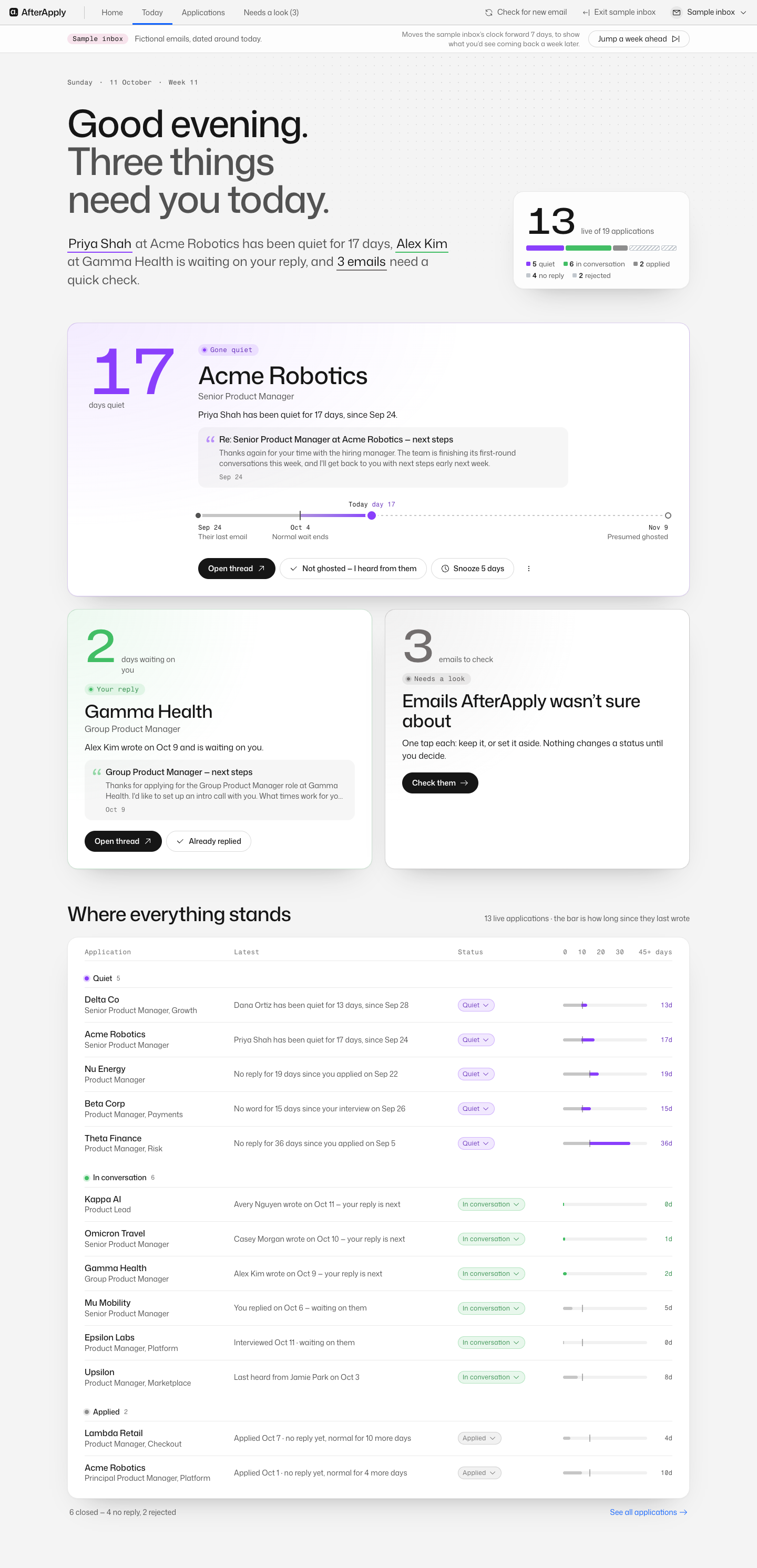
A recruiter waiting on your reply is never quiet; that is a reply to write, and the card says so. The nudge names the person, the role and the days: “Priya Shah has been quiet 17 days.”
Today, at most three cards
One of each kind before a second of any, so three quiet applications cannot bury a recruiter waiting on you. Dead applications age out into a count. On a week when nothing needs you, Today says so.
The correction rule
Corrections were the hard part. A recruiter phones, the user sets “In conversation”, then an automated receipt arrives. My first rule let the newer email overwrite the correction, so the app forgot the call. The rule I landed on is three lines long. A live stage you set still restarts the silence clock, because holding it forever would leave a dead process looking alive.
The seven-step journey
The whole journey is built and clicked through: connect, read six months of mail, check what the app was unsure about, see Today, act on a quiet application, correct a status by hand, come back a week later to statuses that updated themselves. It runs on the sample inbox and on a seeded test Gmail account at this moment before officially launching to the general public.
- 1Connect Gmail, read-only
- 2Read six months of job mail
- 3Check what it was unsure about
- 4See Today
- 5Act on a quiet application
- 6Correct a status by hand
- 7Come back a week later
Four directions for Home
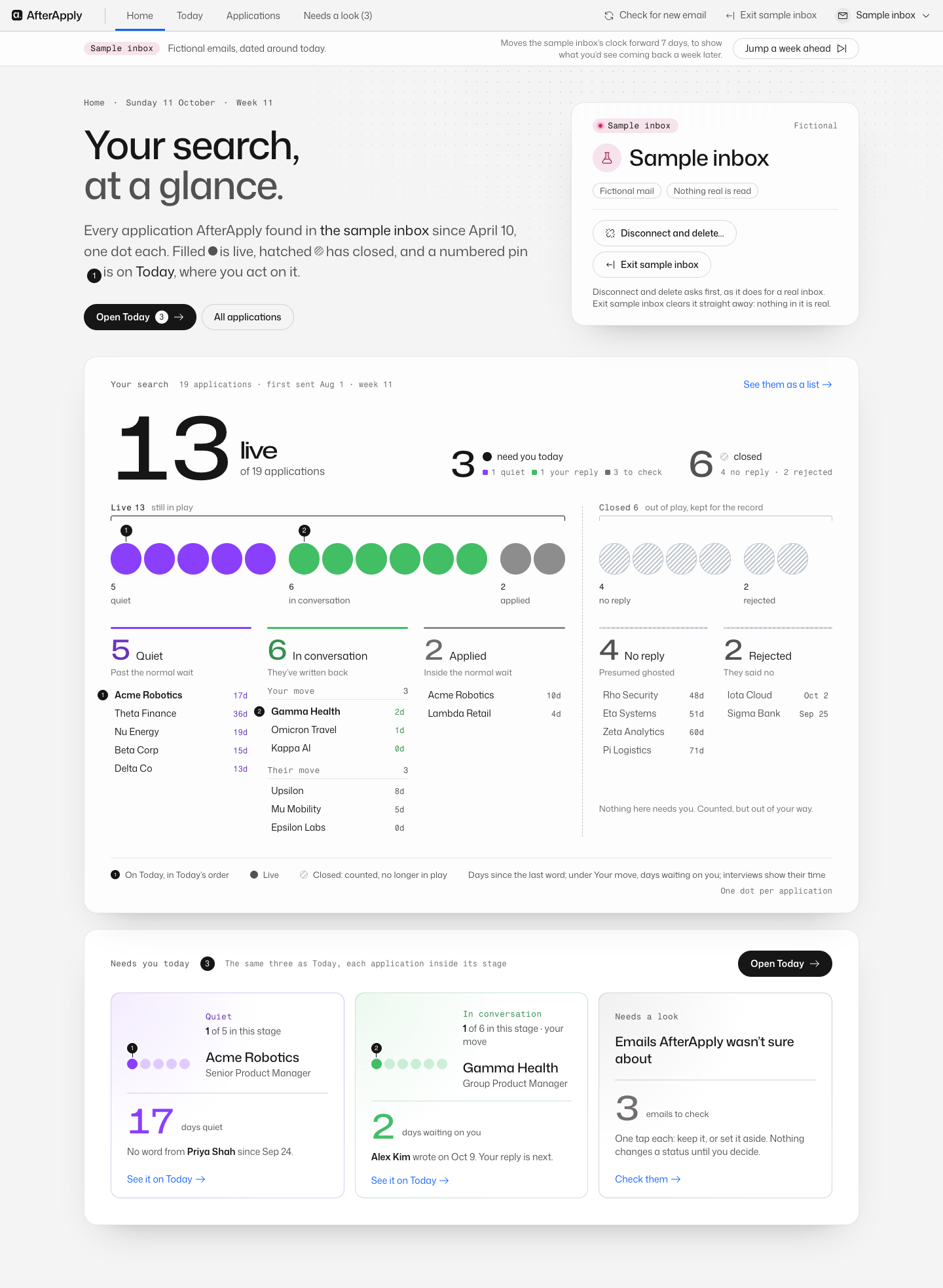
The plan said the user lands on Today. Once the pipeline worked I explored four directions for a Home page, merged the best of them, and made Home the landing instead: every application as one dot in its stage, live and closed kept apart, Today’s three items pinned inside their stages so the two pages can never disagree. I logged it as a departure from my own spec, with the reason.
Prototype
Today, at most three
Today shows at most three cards, one of each kind before a second of any: a recruiter who has gone quiet, a recruiter waiting on your reply, and emails the app was not sure about. Below, every live application with its status and the reason for it. On a week when nothing needs you, Today shows the count, because a dead week is normal in this market and the app should say so rather than render nothing.
Privacy as the first screen
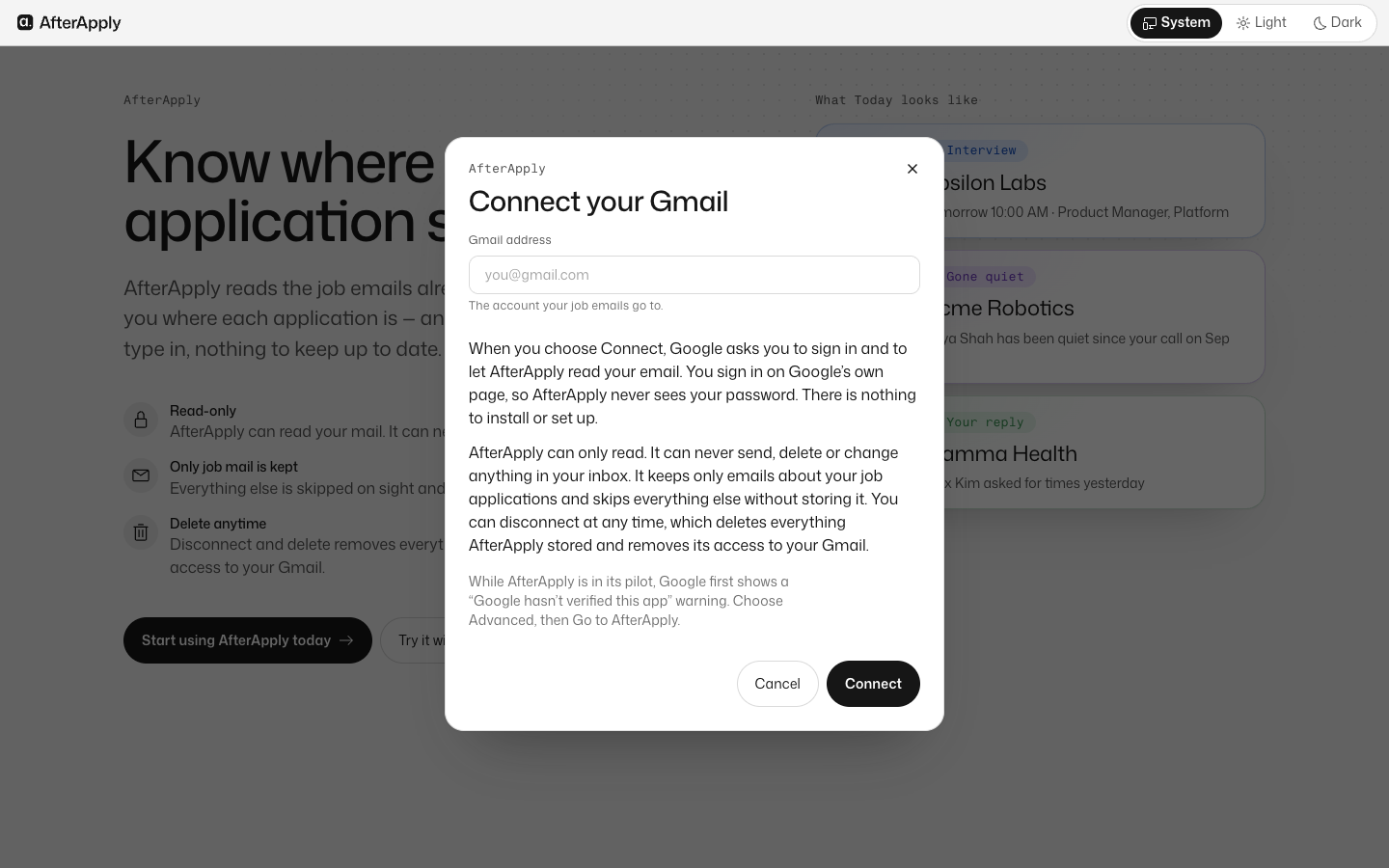
Read-only Gmail access and nothing else. Only job mail is kept, and an email marked “Not job-related” has its subject and body blanked. It never sends; replies are written in the user’s own Gmail. Disconnect and delete removes everything and revokes access. The Connect window says all of this in sentences, not a policy link. I never connected my own inbox for demos; the app runs on a fictional sample inbox.
One look from one file
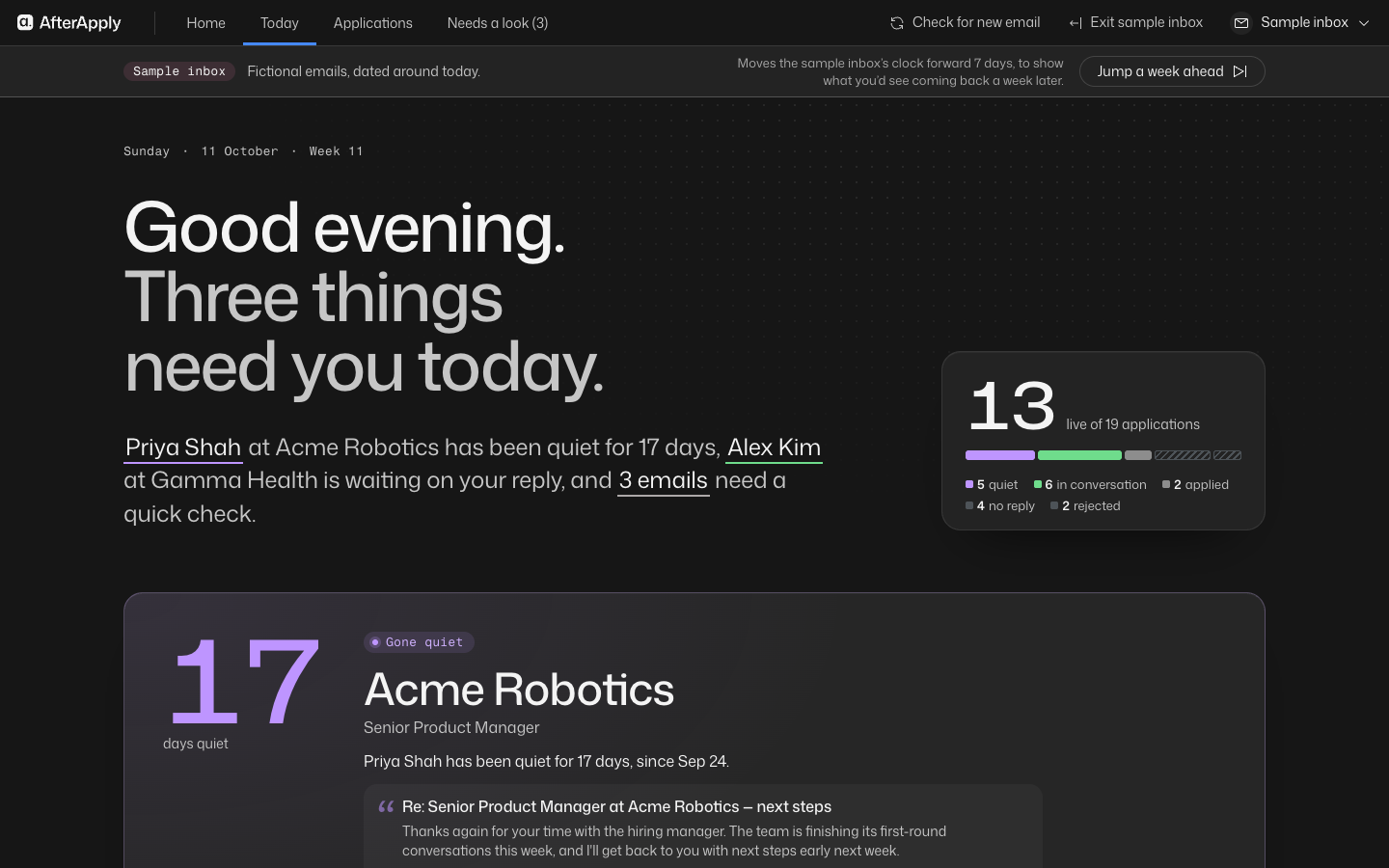
Every colour, corner, type size and timing comes from a single token file; a component library. The type is one grotesque at two weights with a mono for labels. I manually selected typeface. Status is never shown by colour alone, and every tag passes contrast in light and dark. The voice is plain and calm: it never blames the user for silence, and it never cheers.
Test
The 60-second read
The test the design serves is plain: a user states the status of every live application in under 60 seconds, without help. I plan to schedule a test from a pilot of up to ten users in late November 2026.
What the pilot must clear
These are the bars I wrote down before building, and each one is a reason to stop if it fails.
of applications must be captured from email alone, or the idea is dead
correction a week per pilot user, or status does not stay right without upkeep
of quiet flags must be real silence, and a quarter must lead to a follow-up
strangers must read every live application’s status in under 60 seconds
Final product
Conclusion
Key takeaways
The real user problem
Every tracker is built for volume, and volume is not the problem. Tracking breaks at a handful of live processes, half of the people who were ghosted noticed late or never, and the people who most need a record are the ones who have stopped keeping one.
What I’d do differently
With tools like Muse and Dots coming to market, there is less chance of this product being profitable. But since Muse and Dots ask for a much larger amount of personal data, I should position AfterApply as the product where users keep full control: they can disconnect at any time, and their private data is deleted completely when they do.
Let’s connect
For roles, collaborations, or just to say hi.